What is a CVV number?


Written by
Emily Tye
Reviewed by
Amy LancashireCVV (Card Verification Value) is the 3 or 4-digit security code unique to your physical credit or debit card. You may also see if referred to as a CVC number.
Unlike your PIN, it’s used specifically for 'card-not-present' transactions, like when you’re shopping on your phone, to prove that you actually have the card in your hand.
Where is the CVV number?
Your CVV number will be printed on your physical card.
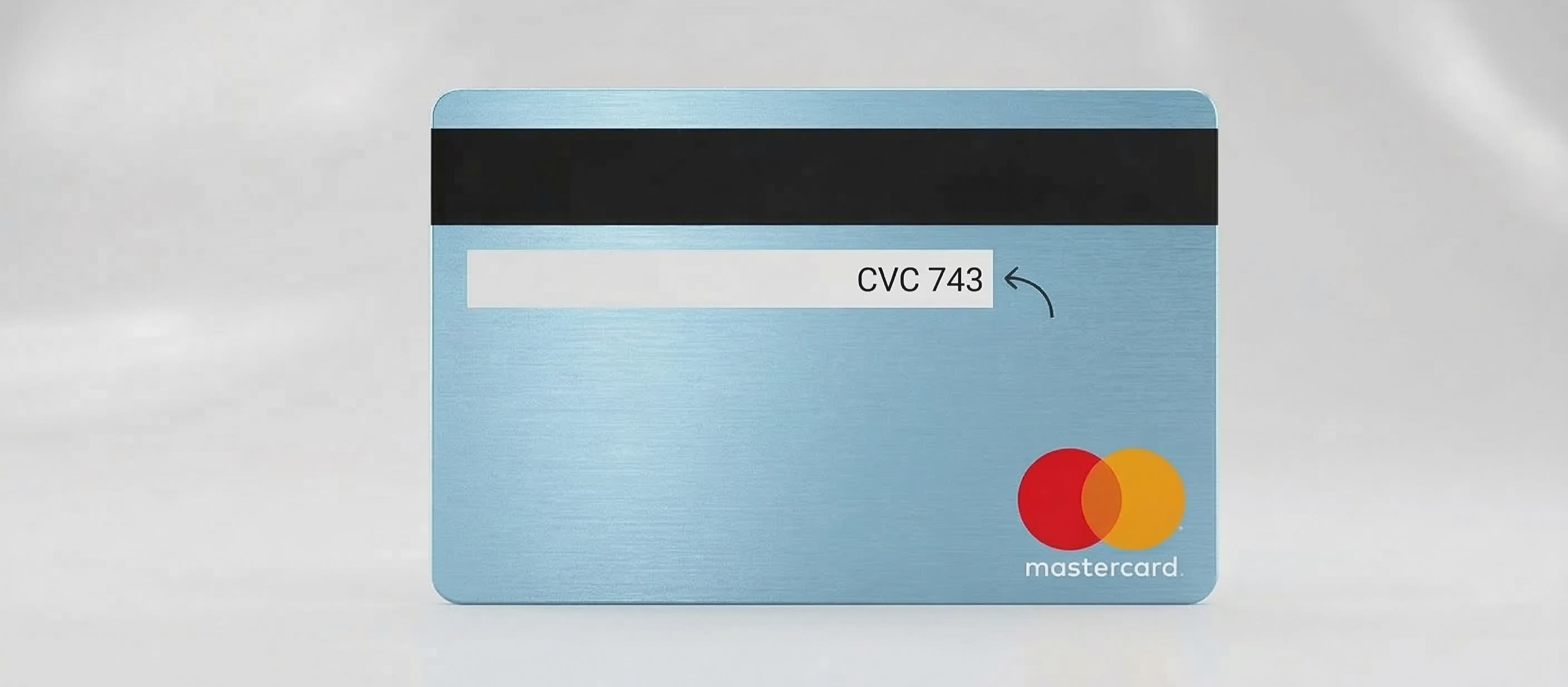
For Visa and Mastercard: Look at the back of your card for a 3-digit number. It’s often printed on (or just to the right of) the signature strip, but its placement can vary depending on the brand. Learn more about the difference between Visa and Mastercard.
For American Express: Look at the front of your card. You’ll see a 4-digit number, usually on the right hand side. It should be the only 4-digit number there.
Depending on your credit card provider, you may be able to see your CVV number in their app, too. It will be labelled as such and will usually require a password or Face ID/Face Unlock to access.
CVV, CVC, CID: Is there a difference?
In short, no. Functionally, CVV, CVC and CID are the same thing. The only real difference is which credit card network is processing the transaction.
Name | What it stands for | Who uses it? |
|---|---|---|
CVV2 | Card Verification Value | Visa |
CVC2 | Card Verification Code | Mastercard |
CID | Card Identification Number | American Express |
CSC | Card Security Code | The general industry term |
CVV vs CVV2: Is there a difference?
No, when you see a merchant requesting you to enter a CVV, they will mean the CVV2 number.
CVV1 (and CVC1) are also security codes, but you don’t need to worry about these. They are invisible, encoded directly onto the card's magnetic stripe and chip. They are automatically read when you insert your card at a physical payment terminal to verify that the card itself is authentic. You never manually enter these ‘1’ codes.
What are CVVs used for?
CVV (or CVC, CID) numbers are used for security purposes. You can think of your 16-digit card number as your username and your CVV number as your password.
When you buy something online, the merchant sends your card information to the bank. However, security laws (like PCI DSS) forbid shops from storing your CVV after the transaction is done.
This means even if a hacker steals a website’s database of card numbers, they usually won't have the CVVs. Without that code, most online checkout systems will block the transaction immediately.
Is a CVV number the same as a PIN?
No, a CVV number (or CVC, CID) is not the same as a PIN. While they are both important security features for your debit or credit card, they serve different purposes and are used in different scenarios.
A CVV is used during ‘card-not-present’ transactions, like online shopping. They verify that you, the cardholder, have the actual physical card in your hand at the time of the transaction. This helps prevent fraud if someone has stolen your card number and expiration date but not the card itself.
A PIN is a secret 4-6-digit number, primarily used at ATMs to withdraw cash or at in-person points of sale, like a store. They verify that you are the authorised user accessing the funds or the account.
3 CVV tips to keep secure
Never share your CVV (or CVC, CID) number over the phone: Unless you called a trusted company's official line, don't give it out.
Watch out for ‘Phishing’: Your bank won’t send you an email or text asking for your CVV to verify your account.
Don’t store it in plain text: Avoid saving your CVV in your phone's Notes app or in an unencrypted email.
This blog is for informational purposes only and does not constitute financial advice. Please speak to a qualified financial adviser before making financial decisions.